

Queue and progress
Frok's worker processes one job at a time. Image batches, video renders, upscaling and explicitly requested built-in Vpipe starters use the queue. Closing a page does not cancel its job.
Built-in preparation shows queued/running status and a runner log, with no model-download progress UI. It cannot interrupt another job or be paused for an immediate generation; let it finish or cancel it. Failure leaves the log available and can be retried, or completed using the manual setup guide.
Drag a pending job by its grip to change its position. Pending jobs cannot be dragged ahead of the running job. Queue order is saved across page reloads.
- Next Up moves a pending job directly after the current job.
- Start immediately stops the current job, runs the selected job first, then resumes the interrupted job's remaining outputs. Saved outputs and logs are kept. An output interrupted during rendering starts again from the beginning.
Switching waits for the current runner to stop. Older ComfyUI versions without individual-job cancellation must finish their current render before the selected job can start.
The sidebar status is available on every page. It shows running or pending work, progress, elapsed time and GPU activity when available. Open Queue for the list, or open a job to inspect its full log.
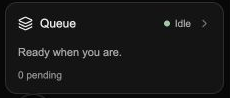
Click Queue to open the job list. This example shows the idle state.
Find the job for an asset
On an asset page, use View job & logs below Video settings. The associated job's current status appears beside the link, including Completed. The link is available while the job record exists. It disappears after the job is deleted or expires; the saved asset remains usable.
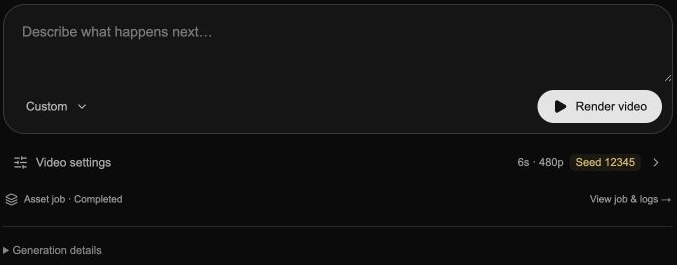
The job link follows the image or video currently displayed.
Read the status
- Queued: waiting for the current job to finish.
- Running: preparing inputs, enhancing a prompt, rendering or saving.
- Completed: output is saved; entries are tucked into the collapsed Finished jobs drawer.
- Failed: inspect the log and error before retrying.
- Cancelled: kept alongside completed jobs in Finished jobs. Expand the drawer to inspect logs or retry.
Cancelling stops work and keeps the job record, log and any saved outputs. After the runner stops, Delete job and logs permanently removes the job's record, logs and working files while preserving saved media. Delete finished jobs does this for all completed, failed and cancelled jobs, with confirmation. What deletion removes →
Older installation jobs remain as history until normal retention removes them. The updated worker cancels pending installation jobs on startup; they cannot be restarted or retried.
Automatic job cleanup
By default, Frok deletes completed, failed and cancelled job records, logs and working files 3 hours after the job finishes. Saved media and the generation settings stored with it stay in your library.
In Settings → Advanced → Background tasks & tools, change Delete job details after to the number of hours you want, or turn off Automatically delete finished jobs and logs to retain details until you delete them yourself. Changes apply to existing jobs too.
The worker checks about once a minute while Frok is running and catches up after reopening. It waits for a stopping runner to finish and retries pending cleanup; a disconnected runner can delay deletion. Once a job is deleted, its log and job-level Retry are unavailable. You can still create another take from retained media. Exports or backups you previously saved keep their own copies.
Why video progress has phases
Video generation usually denoises a latent representation, then decodes it into frames. Frok combines those phases into one estimate:
| Phase | Overall progress |
|---|---|
| Denoising, 1 of 2 | 0–80% |
| VAE decode, 2 of 2 | 80–99% |
| Saving output | Up to 99% |
| Output saved | 100% |
This avoids jumping from 100% back to zero between phases. The weighting is not a prediction of time remaining. A stage with no measurable progress remains indeterminate. Raw runner percentages are still visible in the log.
Time and GPU activity
Elapsed time begins when the worker picks up a job, excluding queue wait. Completed and failed jobs retain their duration. A batch's job time includes shared preparation, while each output can show its own render time in Generation details. Older records with no usable timing show Time not recorded.
The GPU graph represents device-wide utilization, not available VRAM. Frok labels missing or stale telemetry rather than inventing values. Other apps can affect that graph.
Cancel, delete and retry
Cancelling from a job's detail page keeps that page open for review. Deleting the job returns to Queue with a notification. Retry creates a new job and opens its log. Jobs retain workflow snapshots, so changing a pipeline file does not silently change the queued job. If you want new pipeline settings, submit a new generation instead.
In the desktop app, closing the window leaves the queue running in the tray. Explicit Quit offers options when work is active. In web development, the terminal/server must remain running. OS sleep and shutdown can interrupt work. Desktop background behavior →